The Ultimate TV Stand & Lowboard Guide for Modern Living Rooms
Complete guide to choosing and configuring TV stands and lowboards. Media integration, sizing, configuration ideas, and styling tips for modern living rooms.
Check your devices, not only your screen size
Measure the television's actual base, each media device, and the connectors extending from the back. Screen diagonal alone does not tell you whether a stand fits. Plan access to sockets and space for cables without bending them tightly behind the unit.
Active electronics need clearance appropriate to the device manufacturer's instructions. An open compartment is an option to consider, not a guarantee of adequate ventilation for every receiver or console. Before placing a TV on the cabinet, confirm the load specification of the actual configuration. A cabinet below a wall-mounted TV is not itself necessarily wall-mountable. Drilling for the cabinet, TV fixing and cable openings depends on the selected parts and installation instructions. A cable route without a new hole does not establish anti-tip safety or a drill-free installation for every TV or cabinet.
Compare current configurations
Width and depth are axis measurements; overall height includes feet or castors. Axis height is shown below.
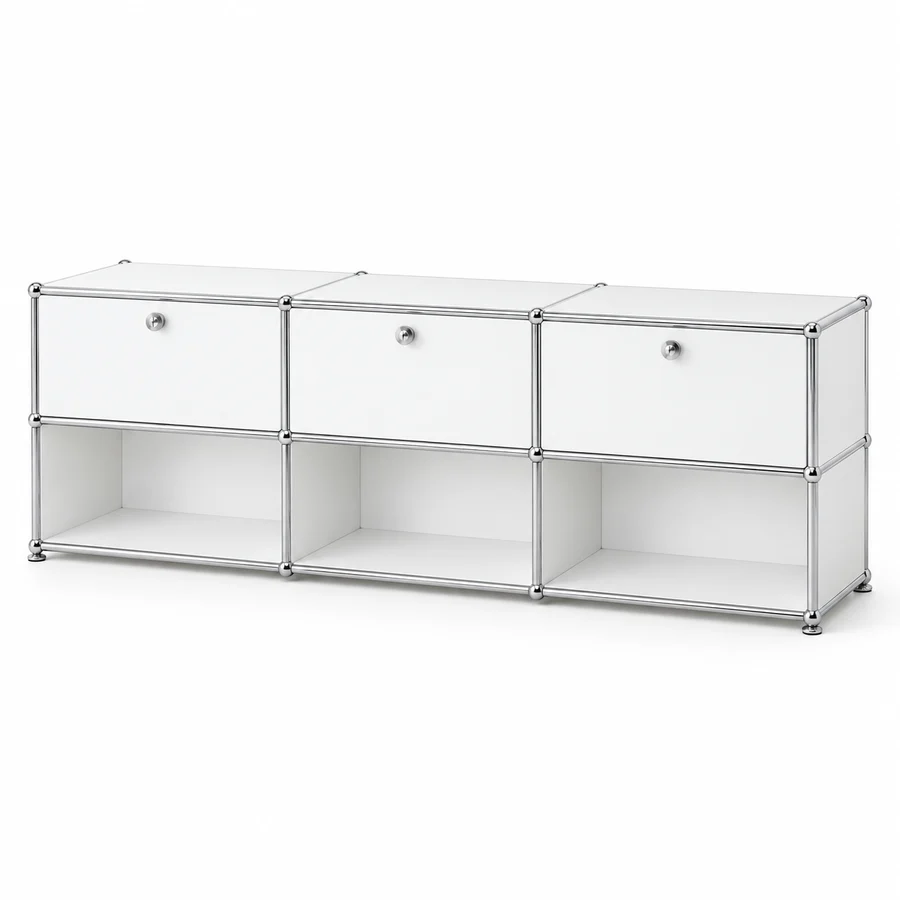
Modular TV Lowboard — USM Haller Compatible
- Overall W × H × D (including feet)
- 2275 × 751 × 375 mm
- Axis height: 725 mm
- Doors:
- 3
- Drawer fronts:
- 0
Configured item price: $1,102.79 (USD)

Mid-Century Olive Green TV Lowboard, Three-Row — USM Haller Compatible
- Overall W × H × D (including feet)
- 2275 × 576 × 375 mm
- Axis height: 550 mm
- Doors:
- 3
- Drawer fronts:
- 0
Configured item price: $1,090.94 (USD)
Reference price in the currency shown, calculated from this design. Changes are repriced in 3D. Destination-specific delivery, taxes and final total are confirmed before payment.
The TV stand has evolved from a simple box to an essential design element. A well-chosen lowboard not only supports your television but defines your living room's entire aesthetic. Here's everything you need to know about choosing and configuring the perfect media furniture.
What Is a Lowboard?
A lowboard is a low-profile cabinet, typically 35-50cm in height, designed primarily for media equipment and display. The term comes from German design tradition, where height-based furniture naming is common:
- Lowboard: 1 row high (35-40cm) — Media equipment, below-TV storage
- Sideboard: 2 rows high (70-80cm) — General storage at hip height
- Highboard: 3+ rows high (100cm+) — Tall storage reaching chest height
Why Modular Lowboards Excel
Perfect Media Integration
USM Haller and Klackjoy lowboards accommodate modern media needs:
- Cables — Plan a route that fits plugs, sockets and the actual rear-panel layout.
- Heat — Follow each device manufacturer's ventilation clearances; an open compartment alone is not a guarantee against overheating.
- Changes — Check part availability and structural compatibility before extending a configuration.
Scalable Width
Choose width from the television's physical dimensions and its support footprint, not its screen diagonal alone. Check the cabinet's outside dimensions, usable top surface and the space needed for speakers and access; a nominal module width is not the finished outside width.
Configuration Ideas
The Minimalist Float
Configuration idea: 2 × 1 | Floor-standing cabinet beneath a separately wall-mounted TV | Graphite Black
Mount your TV above a sleek, unadorned lowboard. The minimal footprint creates the illusion of floating media.
Best for: Small apartments, minimalist interiors
The Media Hub
Configuration: 3 × 1 | With drop-down doors | Pure White
Generous width accommodates soundbar, gaming consoles, and streaming devices. Drop-down doors hide the inevitable cable mess.
Best for: Home entertainment enthusiasts, families
The Asymmetric Statement
Configuration: 3 × 1 + 1 × 2 side extension | Steel Blue
Break the horizontal line with a taller section for decorative objects or books. Creates visual interest while maximizing function.
Best for: Design-forward homes, collectors
The Full Wall
Configuration: 4 × 1 lowboard + 2 × 3 side towers | Anthracite Grey
For dedicated media rooms. The lowboard stretches wall-to-wall, flanked by tall storage units. A complete entertainment solution.
Best for: Home theaters, large living rooms
Does a TV lowboard mean I can install everything without drilling?
No. Separate the cabinet's assembly and fixing, the television's support or wall mount, and the cable route. A cable route that uses an available opening does not answer the fixing requirements of either object. A cabinet standing below a wall-mounted screen is not itself a wall-mounted cabinet, and a low layout alone does not establish anti-tip safety.
Start with a record of the actual installation, rather than a screen-size recommendation:
| Item | Record before choosing the layout |
|---|---|
| Television | Exact model, support-foot or base footprint, installation instructions and weight |
| Cabinet | Complete configuration, usable top surface, supports and the applicable load and fixing specification |
| Media equipment | Body dimensions, protruding plugs and the manufacturer's ventilation clearances |
| Cable route | Plug body dimensions, socket positions, opening location and access for later disconnection |
| Room | Available outside space, obstructions behind the unit and conditions for any proposed fixing |
The existing lowboard starter is a planning shortcut, not a matched TV installation kit. Its source configuration has three 500 mm nominal columns, one 350 mm nominal row and 350 mm nominal depth, with eight glides. The centre unit has no front-panel flag in that preset. Those values do not specify a universal finished height, a television load limit, an included wall bracket or a guaranteed rear opening. Review the complete design after editing; do not identify this starter with a different configuration shown in an article or photograph. The parameterized Graphite Black 2×1 lowboard instead uses two 750 mm nominal columns; the Pure White 3×1 lowboard uses three 750 mm nominal columns. These are different entry designs, not alternative labels for the three-500 mm starter. The software's with-doors variants retain back and front flags, so a pictured TV unit must not be treated as a universally open-back design.
If the television stands on the cabinet, check its actual feet or base against the usable support surface. Obtain the permitted load and distribution for that cabinet, panels and supports, and follow the television's instructions. Screen diagonal or matching nominal width is not enough.
If the television is separately wall-mounted, follow the television and mounting hardware's instructions for the actual wall. Do not infer that the cabinet is suitable for suspension, or that no cabinet fixing is needed, merely because the screen is on the wall. If suitable fixing requirements cannot be confirmed, keep that installation decision unresolved.
For cables, first see whether the selected configuration has a usable existing route. Measure the plug, not just the cable: a thin lead may have a much larger connector. A rear-opening option must be confirmed for the actual panel and configuration. Do not remove a rear or structural part simply because an illustration looks open. Custom opening dimensions and positions remain subject to the editor's checks and production confirmation.
Finally check socket access, future replugging, and each device's required air path with the fronts in their intended operating position. An open compartment or perforated panel is an option, not proof that every device will remain cool or receive infrared commands. If any load, fixing or thermal condition is unverified, do not convert a preview into a safety guarantee.
Technical Considerations
TV Mounting Options
Placing a TV on the cabinet:
- Measure the TV feet or base and confirm they sit fully on the usable top surface.
- Obtain the load limit for this exact cabinet, including top panels, supports and load distribution.
- Do not infer TV fit from a nominal depth or screen size; follow the TV manufacturer's installation instructions.
Wall mounting above lowboard:
- Lowboard handles components only
- Cleaner look, no base visible
- More flexibility in lowboard positioning
Heat Management
Electronics generate heat. Ensure adequate ventilation:
- Check the device manual for clearance around vents, connectors and power supplies.
- Confirm which rear-panel and open-compartment options are actually available for this design.
- Keep the required air path unobstructed; do not remove structural parts or assume a ventilated panel is included.
Weight Capacity
Load capacity is configuration-specific. Confirm the permitted load and its distribution for the selected panels, frame and supports with Klackjoy before placing heavy equipment. This guide does not establish a universal shelf rating or certify a reinforced version.
Styling Tips
Create Visual Balance
The lowboard should relate proportionally to your TV:
- Lowboard width = TV width + 20-40cm on each side
- Creates a grounded, intentional look
Add Warmth
Steel and glass can feel cold. Balance with:
- Wooden decorative objects
- Ceramic vases or sculptures
- Textile elements (runners, baskets)
Light Consider
Position lowboards away from direct sunlight:
- Prevents screen glare
- Protects equipment from heat
- Maintains color vibrancy of panels
Lowboard vs TV Stand: The Verdict
Compare a fixed TV stand and a modular lowboard against the same checklist:
| Decision | What to confirm |
|---|---|
| Size | Outside dimensions, usable surface and available module lengths |
| Future changes | Compatible parts, availability and assembly requirements |
| Cables and heat | Actual openings and the equipment manufacturer's clearances |
| Service life | Materials, care, use and applicable warranty; no universal lifespan is promised |
Ready to design your perfect lowboard? Launch the 3D Configurator and visualize your media setup.
Related Articles:
Frequently Asked Questions
How wide should a TV stand be for my TV?
Check the television's actual support feet or base against the cabinet's usable top surface and complete outside dimensions. Screen diagonal alone does not establish support fit. Confirm the permitted load and its distribution for the selected cabinet, panels and supports, and follow the television manufacturer's instructions. Choose the layout from supported nominal modules without treating nominal width as a finished or usable surface dimension.
What is the ideal height for a TV stand or lowboard?
The ideal height places the centre of the screen near seated eye level, around 100-110cm from the floor. For most sofas that means a stand or lowboard 40-60cm tall, since the TV adds further height. Lower lowboards around 35-45cm suit relaxed seating, while higher units improve viewing from a dining chair.
How do I hide cables in a TV stand?
Plan the route from each device to the socket, allowing room for plugs and access. Cable clips or sleeves can organize loose wiring. Confirm the actual rear-panel openings and available options for your selected configuration; do not assume every back panel can be removed safely.
How much storage do I need in a media unit?
List each device, its outside dimensions, plug depth and required ventilation clearance. Assign space to equipment first, then add closed storage for discs, games and accessories. An open shelf does not by itself guarantee safe operating temperature; follow the device manual and confirm the planned layout before ordering.
What is the difference between a lowboard and a TV stand?
A lowboard is a long, low cabinet that often runs wider than the TV and doubles as living-room storage, while a TV stand is usually a smaller piece sized mainly to hold the screen. Lowboards suit larger TVs and open-plan rooms. A modular media unit like Klackjoy spans both roles, since you set the length, height and mix of shelves and doors.
Shop the Klackjoy modular system
Read next
- Buying Modular Steel Furniture from the Factory: Foshan Manufacturing, DDP Shipping vs Dropshipper PitfallsConsidering sourcing modular ball-and-tube steel furniture directly from China? Learn the manufacturing realities of Foshan metal fabrication, avoid sea-freight port fee traps, and understand engineering standards.
- The Ultimate Guide to Modular Steel TV Consoles: Cable Management, Heat Dissipation & ErgonomicsPlan TV-console cable routes using the actual rear panels, plug sizes and supported openings. Check fixing and device ventilation separately; no universal drill-free or anti-tip guarantee.
Ready to design your own modular furniture?
Use the free 3D configurator to plan a modular unit from the independent brand Klackjoy — choose size, color, and panels, and verify the exact compatibility requirements for your project.
Price example: a 2×2 sideboard with four drop-down doors, 152 × 75 cm — $988.81 before delivery. See this sideboard →
Design your modular furniture